CNIC Registration in NSER: A Complete Guide for Government Assistance in Pakistan
CNIC Registration in NSER
Every family in Pakistan seeking financial support from government programs must ensure proper CNIC registration in the National Socio-Economic Registry (NSER). The NSER is a nationwide database designed to assess household income, living standards, and assets. Accurate registration is essential because it determines eligibility for assistance programs such as the Benazir Income Support Programme (BISP).
Understanding the NSER registration process is crucial for families to secure financial aid and avoid delays or complications. This guide provides step-by-step information on how to register, required documents, the survey process, and what to expect after submission.

You Can Also Read: 8171 Registration Update 2026: Complete Guide for New and Existing Beneficiaries in Pakistan
Why CNIC Registration in NSER Is Essential
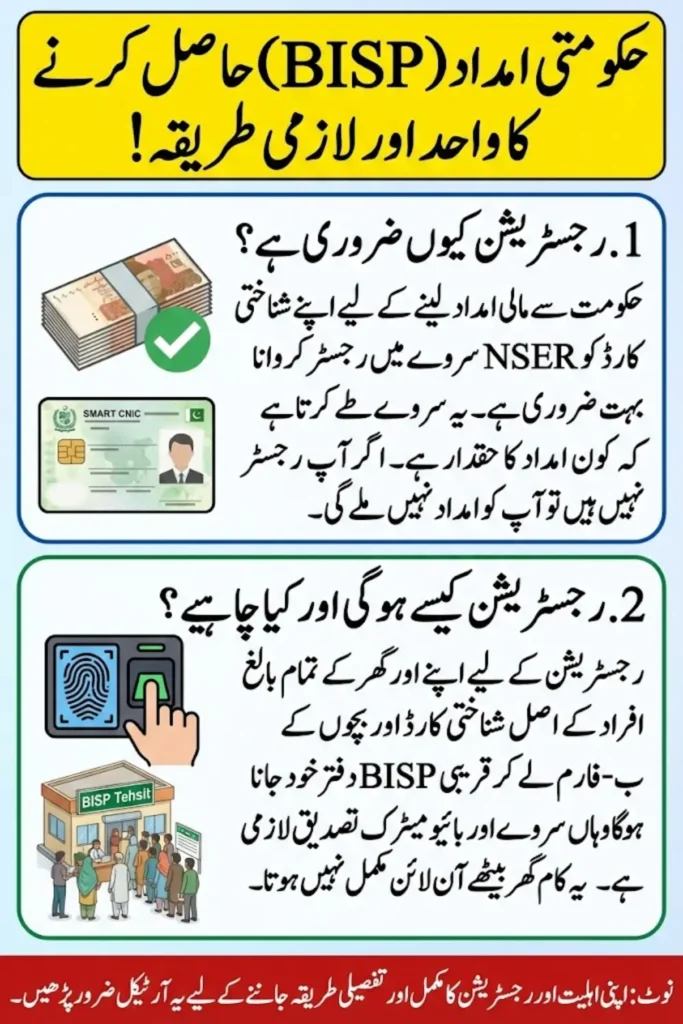
NSER registration links your identity with official NADRA records. It ensures that only eligible households are considered for government assistance programs. Registration helps in:

- Verifying the household through official records
- Preventing duplicate entries or fraud
- Calculating the Poverty Means Test (PMT) score accurately
- Providing transparency in aid distribution
Without valid CNIC registration, households cannot participate in welfare programs, making this step indispensable.
You Can Also Read: Suzuki Cultus 2026 in Pakistan: Price, Variants, Features, and Complete Review

Can CNIC Registration Be Done Online?
Despite growing digital services, NSER registration cannot be completed entirely online. Physical verification is mandatory because:
- Biometric verification is required
- Original documents must be presented
- Household details need to be physically recorded
However, you can check preliminary eligibility via SMS before visiting a registration center. This step can save time by confirming whether your household data already exists.
How to Check CNIC Status Before Registration
To confirm your household record:
- Open your mobile messaging app
- Type your 13-digit CNIC number (without dashes)
- Send it to 8171
SMS Responses:
| Response Message | Meaning |
|---|---|
| Visit BISP Tehsil Office | Your data is not yet registered or needs updating |
| Data already exists | Follow further instructions from the message |
This simple check helps avoid unnecessary visits to the registration center.
You Can Also Read: 8171 Benazir Income Support Program 2026: How to Check, Verify, and Collect Your Installment
Visiting an NSER Registration Center
To complete registration, families must visit an authorized center in person. The most common locations include:
- BISP Tehsil Offices
- Official NSER Registration Desks
Best Practices for Visiting
- Arrive early to avoid long queues
- Visit during official working hours
- Avoid public holidays if possible
Documents Required for CNIC Registration
Carrying correct documentation ensures a smooth registration process. Only original documents should be presented.
Mandatory Documents
- CNIC of head of household (female head preferred)
- CNICs of all adult family members
- B-Forms or birth certificates of children
Supporting Documents (if available)
- Electricity or gas bill (proof of residence)
- Rent agreement (for tenants)
- Disability certificate (if applicable)
- Death certificate (for widows)
Missing documents may delay registration or require a return visit.
You Can Also Read: Imam Masjid Support Program 2026: Monthly Stipend Initiative for Mosque Leaders in Punjab
NSER Household Survey Process
Once at the center, the NSER survey team will conduct a detailed household assessment. The survey includes:
- Token Issuance: Each applicant receives a token number to manage queues.
- Data Collection: Representatives record information including:
| Survey Section | Details Collected |
|---|---|
| Household | Family members, relationships, dependency ratio |
| Income & Expenses | Monthly income, employment type, expenses |
| Housing | Owned/rented property, rooms, construction type |
| Education & Work | Education levels, employment, skills |
| Health & Disabilities | Chronic illness, disabilities, medical dependency |
| Assets | Vehicles, land, livestock, businesses |
Accuracy is critical. Providing false information may result in disqualification.
PMT Score Calculation
The PMT (Poverty Means Test) score is calculated automatically using survey data. Factors affecting the score include:
- Household income
- Family size
- Assets and property ownership
- Education and employment status
- Living conditions
A lower PMT score usually increases eligibility for assistance programs.
You Can Also Read: How to Get a MEPCO eOps New Connection After ENC Closure
Biometric Verification
After the survey, biometric verification is required to confirm identity. This process involves:
- Thumb impressions
- Verification against NADRA records
If verification fails, applicants may need to revisit the center with updated CNICs.
Registration Acknowledgment
After successful registration, applicants receive a slip containing:
- Tracking number
- Proof of survey completion
Keep this slip safe, as it is needed for future inquiries or follow-ups.
Receiving Final Confirmation
Once the data is processed, households receive SMS confirmation. Outcomes may include:
- Successful inclusion in NSER
- Requests for additional verification
- Instructions for re-survey
It is important to only rely on official messages from 8171 and avoid third-party communications.
Common Registration Mistakes to Avoid
- Providing incorrect income details
- Missing required original documents
- Failing to update household changes
- Losing the registration slip
- Ignoring official SMS notifications
Avoiding these errors ensures faster processing and higher chances of approval.
You Can Also Read: BISP Phase 2 Payments 2026: How to Check Eligibility and Receive Rs. 13,500
Timeline for CNIC Registration
- Survey completion: 30–60 minutes
- Data processing: Several weeks
- SMS confirmation: Timeline varies depending on verification
Patience is important as NSER registration involves coordination across multiple departments.
Updating NSER Records
NSER registration is not permanent. Households must update their records whenever circumstances change, such as:
- Change in family members
- Relocation
- Change in income or assets
Maintaining accurate records ensures continued eligibility for government assistance.





Conclusion
Registering your CNIC in NSER is a critical step for families seeking financial aid from government programs in Pakistan. By following the correct procedures, carrying the required documents, completing the survey accurately, and undergoing biometric verification, households can secure their rightful place in government welfare initiatives. Always keep your registration slip safe and respond promptly to official SMS notifications to avoid delays in receiving support.
You Can Also Read: Pension Updates in Pakistan 2026: What Retirees Need to Know