How to Complete Your CNIC Renewal Quickly: NADRA’s Latest Alert & Easy Mobile Renewal Steps
How to Complete Your CNIC Renewal Quickly
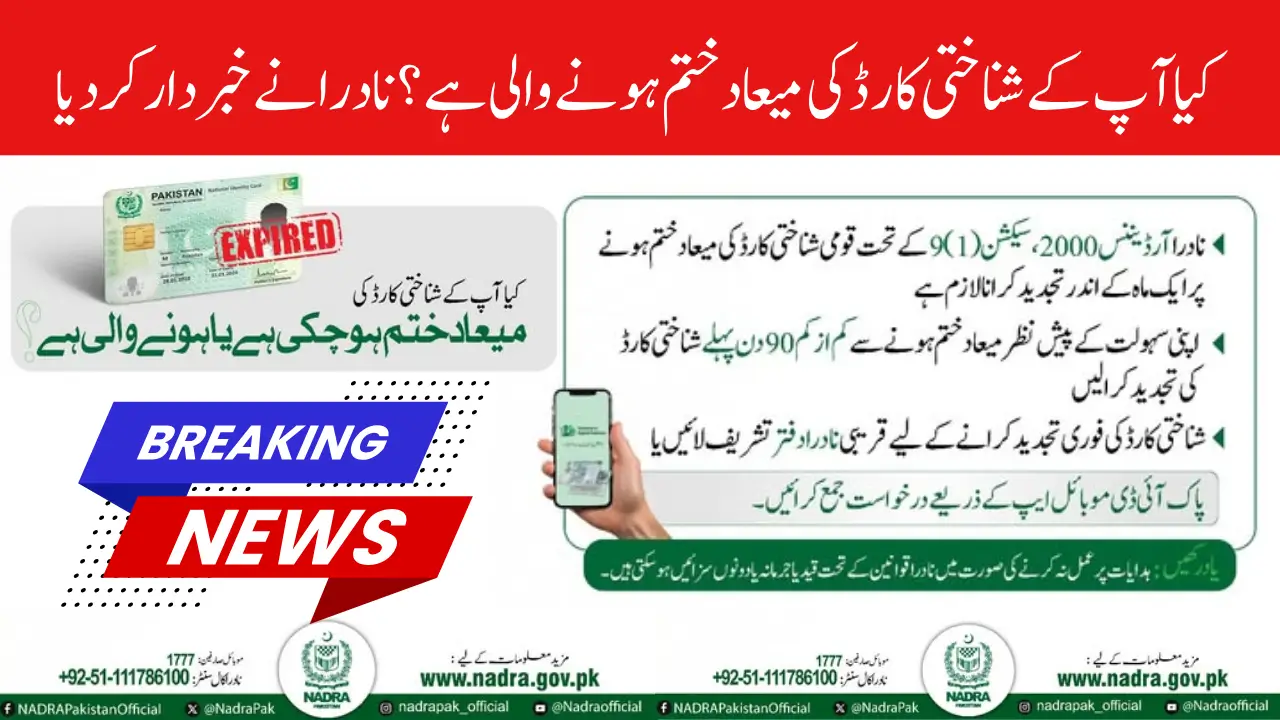
Have you checked your CNIC expiry date recently? If not, now’s the time! NADRA (National Database and Registration Authority) has issued an important message for all Pakistani citizens reminding everyone to renew their CNIC before it expires.
To make the process easier, NADRA now allows you to renew your CNIC from home using the Pak ID Mobile App, without visiting a registration center. Let’s dive into everything you need to know about the CNIC renewal process, deadlines, and how to avoid fines.


Why CNIC Renewal Matters
Legal Requirement under NADRA Ordinance 2000
According to Section (1) 9 of the NADRA Ordinance 2000, it’s mandatory to renew your CNIC within one month after it expires. Failing to renew within this period can result in penalties or suspension of services linked to your identity card.
Real-Life Consequences of an Expired CNIC
An expired CNIC can cause serious problems in daily life. You might face issues with:

- Bank transactions and ATM access
- Receiving government benefits like BISP or Ehsaas payments
- Mobile SIM registration and re-verification
- Passport renewal or travel
- Voting in national or provincial elections
Keeping your CNIC updated ensures smooth access to all these essential services.
Important Dates and Timelines for CNIC Renewal
The 90-Day Rule
NADRA recommends that citizens begin the CNIC renewal process at least 90 days before the expiry date. This gives enough time to process your application and receive your new card without any service interruptions.

The One-Month Legal Window
After your CNIC expires, you have one month to renew it. If you fail to do so, your card becomes invalid, and certain services may be blocked until renewal is complete.
Official NADRA Channels for CNIC Renewal
Renew CNIC via Pak ID Mobile App
The easiest and fastest way to renew your CNIC is by using the Pak ID Mobile App, available for both Android and iOS users. You can complete the entire process from home — from submitting your application to making payment and receiving your CNIC through courier.
Visit a NADRA Registration Center
If you face technical issues with the app or need in-person verification, visit your nearest NADRA Registration Center. The staff will assist you with biometric verification and form submission.
NADRA Mobile Registration Vans
For citizens living in remote areas, NADRA operates Mobile Registration Vans that travel to various localities. These vans make it easier for people in villages or rural towns to renew their CNICs without visiting distant offices.
Documents Required for CNIC Renewal
Standard Documents Checklist
To renew your CNIC, you’ll need:
- Your expired CNIC
- Biometric verification
- Updated photograph (if required)
- Proof of address (if changed)
Special Cases
If you have lost your CNIC, changed your name or address, or are upgrading from a juvenile card to an adult CNIC, additional documents will be needed, such as:
- FIR copy (for lost CNIC)
- Marriage certificate or affidavit (for name change)
- Utility bill (for address update)
Step-by-Step CNIC Renewal Using Pak ID Mobile App
Step 1: Download and Register
Install the Pak ID Mobile App from the Play Store or App Store. Create an account using your mobile number and CNIC details.
Step 2: Start the Renewal Application
Choose “Renewal” in the application menu. Fill out your personal information and upload the required documents.
Step 3: Upload Photo and Signature
You can take a photo directly from the app or upload one from your gallery. Then, add your digital signature as instructed.
Step 4: Pay the Fee Online
Make the payment using your debit or credit card through NADRA’s secure gateway.
Step 5: Track and Receive Your CNIC
Once your application is approved, NADRA will deliver the renewed CNIC to your home address through courier.
CNIC Renewal Fee and Processing Time
Standard Renewal Fee
NADRA charges a small fee for CNIC renewal, which depends on the type of service you choose Normal, Urgent, or Executive. Executive renewals are processed faster but cost slightly more.
Late Renewal and Fines
If you renew after the one-month grace period, you may need to pay additional charges. Renewing on time helps you avoid these penalties.
Common CNIC Renewal Problems and Quick Fixes
App Errors or Login Issues
If the Pak ID app doesn’t open or crashes:
- Make sure you’re using the latest version.
- Clear the app cache or restart your phone.
- Try switching to a different internet connection.
Biometric Verification Failures
If your biometric verification fails in the app, you’ll need to visit a NADRA office for manual verification. Bring your original CNIC and supporting documents.
How to Check CNIC Expiry and Renewal Status
Finding the Expiry Date
Your CNIC expiry date is printed clearly on the front side of your card under your birth date.
Track Renewal Application
You can check your CNIC renewal status through:
- The Pak ID Mobile App (Track Application section)
- The NADRA official website using your application number
Tips to Avoid CNIC Renewal Delays
- Start renewal 90 days before expiry
- Ensure your photo and documents are clear
- Keep payment proof and application number safe
- Follow NADRA’s SMS and email alerts for updates
Frequently Faced Scenarios
If My CNIC Has Already Expired
Don’t panic just apply for renewal immediately. NADRA allows one month after expiry to renew without major penalties.
If I Changed Address or Name
Provide supporting documents like a utility bill or affidavit to verify your updated information.
How Banks and Employers Verify CNIC Status
Banks, telecom companies, and government departments regularly verify CNIC validity through NADRA’s online database. If your CNIC is expired, your account, SIM, or benefits may be temporarily suspended. Always keep your CNIC active to avoid these issues.
NADRA’s Awareness and Alerts
Official Messages and Campaigns
NADRA frequently posts alerts on social media, reminding citizens about CNIC expiry and renewal deadlines. Follow NADRA’s verified pages to stay updated.
Avoiding Renewal Scams
Never share your CNIC details or OTPs with unknown individuals. Only use NADRA’s official app or website for renewal payments and applications.
NADRA Helpline and Support
Contact Information
You can contact the NADRA helpline at 1777 (for mobile users) or visit www.nadra.gov.pk for help.
Support for Elderly or Disabled Citizens
NADRA provides special services through home delivery or authorized representatives for citizens who cannot visit centers physically.
Quick CNIC Renewal Checklist
✅ Check CNIC expiry date
✅ Start renewal 90 days before expiry
✅ Download Pak ID App
✅ Upload documents and pay fee
✅ Track delivery online
Stick to this checklist, and you’ll never have to worry about your CNIC expiring again!
Conclusion
Your CNIC is your identity don’t let it expire! NADRA has made the CNIC renewal process simpler than ever with its Pak ID Mobile App. Whether you’re at home or in a remote village, you can renew easily and stay legally compliant. Check your CNIC today and renew early to avoid penalties and service delays.
FAQs
How many days before CNIC expiry should I renew?
You should start your CNIC renewal at least 90 days before the expiry date to avoid any delays.
Can I renew my CNIC using the Pak ID Mobile App?
Yes! You can renew your CNIC from home using the Pak ID Mobile App on Android or iOS.
What is NADRA’s legal deadline after CNIC expiry?
You must renew your CNIC within one month after it expires as per NADRA Ordinance 2000.





What documents are needed if I change my address?
You’ll need to provide an updated utility bill or residence proof to confirm your new address.
What to do if my CNIC renewal application is rejected?
Check for missing information or unclear documents, fix the issue, and reapply through the app or NADRA office.